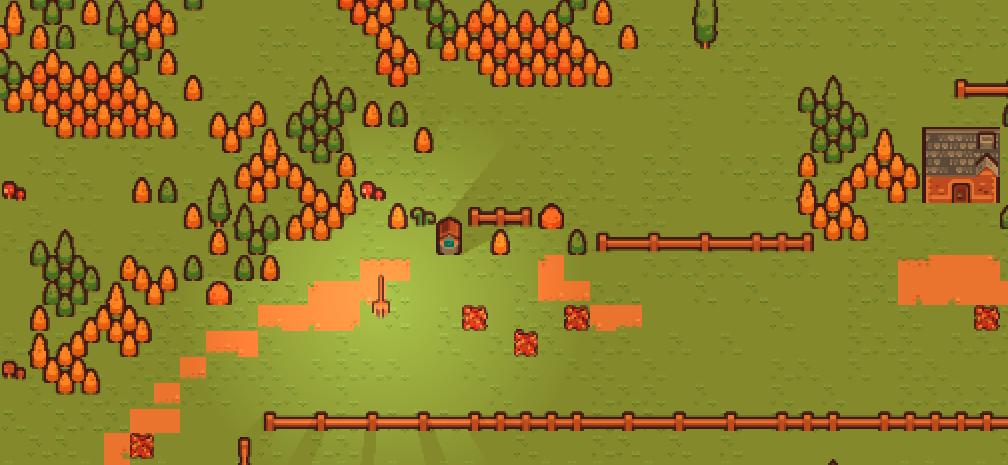
Finders, Sweepers!
Cozy Fall Jam 2025 - DevLog #5: The Scope Creeps (backwards)
THE SECOND DAY
25th October 2025
06:05
I managed to make more progress than I expected, in the few hours that I worked on the game yesterday. Now I have a character controller, some bare-bones piles of leaves, and the core logic for handling sweeping the leaves. However, I reduced the already "small" scope of the game, to something even simpler. I hope this will give me more time for polish. This is the new scope:
MVP:
- One area
- Character controller
- No NPCs
- Sweep (just press spacebar or E)
- Piles of leaves (two states: piled or swept)
- Items hiding under piles of leaves
- Small text associated with each item
- Sprites
- Animations
- SFX
- Music
- Menus
Extra:
- Simple inventory screen - bar on bottom that shows how many items have been collected
Sweep = interactive (hold mouse, drag left and right) - Piles of leaves (three states: piled, sweeping or swept; used for playing the animation)
- Item indication - find one item and you feel inspired! Now you can summon the wind once: it rustles all the piles of leaves on the screen; a glint shows up under a random item. Recharge wind by finding another item.
- Restart the same level with new random locations; items have a new description
- Tileset/environment has some idle animations
- Parallax layer right in front of the camera
- Falling leaves animation
What do I need to handle next? The items hiding under piles of leaves. The general idea is:
- I have the "pile" scene
- WHEN THE LEVEL STARTS, PICK X RANDOM PILES OF THE EXISTING ONES
- GIVE THESE X PILES A NEW PROPERTY - HAS_ITEM
- when the PC sweeps for long enough, the pile disappears & the item appears
- here, I can handle it in one of two ways:
- pause the game and put it up on the screen in a nice way - like in the old Zelda games where Link picks up an item and goes into a key pose, holding the item above his head; or even something simpler, but still flashy
- throw the item somewhere away, the PC has to walk to pick it up; then pause the game & display the description
Surprisingly, the first one seems simpler; it implies less code to write. Famous last words?
---
I'm dealing with how to disable the piles of leaves, once swept away. So, when I want to disable the Area2D for a pile of leaves I just call this, inside the script attached to the pile scene, triggered by a signal.
self.set_process_mode(PROCESS_MODE_DISABLED)
But I just realized I have a problem right now: if I want to restart the level (and not go back to the menu) I need to revert everything to how it was before, including enabling processing for all these piles. But I can't do it with the same script since they're... Well, disabled.
Since this is in the "extra" tier, it's not a problem I have to deal with yet.
----
After implementing the code for "sweeping away" the pile (a.k.a. the Area2D just disappears; still using debug collisions as assets), I found a new problem: the PC can stand on more than one pile at the same time. After PC sweeps away one pile, if they continue sweeping - nothing happens; PC has to exit & enter the Area2D, and start sweeping again. I have an idea for a fix:
Assign a property to this pile is_entered and update it accordingly. Then I don't need to check for the collisions themselves while sweeping, only for the piles that have is_entered = true; but to not make it too easy, I won't sweep away all of the piles with is_entered = true. I will instead get an array of them, and sweep them in order, with a small timeout in-between.
---
I managed to assign the correct states and... It looks like Godot will crash. At the very least, it's frozen and unresponsive.
---
I restarted Godot & thankfully I didn't lose any progress. Good thing I have this CTRL + S muscle memory from dealing with Windows all the time at work... In any case, I managed to find a simple solution for the problem I described earlier: create the array I mentioned, but don't iterate on it. Simply sweep the pile at index 0 and immediately delete it from the array; if the PC keeps holding the mouse pressed, the array is not updating (since the PC can't move) so each time the loop iterates, it removes the element in question (pile being swept) from the array.
---
Of course, I literally ended up in the situation where the array is empty and the game crashes. But it is easy to fix.
---
IT'S 7:57
Time to take a break and walk the dog. I think I made some pretty decent progress so far, and I still have the entire day ahead of me, and tomorrow as well. My plan is to finish with the code today, and spend all day tomorrow on assets & polishing. Next up: make an item appear & display on screen. To detail after my break.
---
08:55
Ok, so what do I need to make this happen? I need to check if what the player swept away had an item (has_item == true, already set when instancing the pile node). If it does, this acts a trigger for:
- pausing the game
- increment "items_found" counter
- display UI with item & text
- if the player presses a key, hide UI & unpause the game
New idea: should there also be a counter for "piles_swept"? So the player has two goals: find all items & sweep all leaves? Goes to extra.
---
IT'S 09:44
I just realized that I wasted the last hour fiddling with the UI, trying to make something that looks good. Besides losing my focus & wasting some time I don't have, I have also failed to make anything that looks good. I have to focus.
What I need is an UI with three elements:
- TextureRect, to display the item (problem found: if I replace the image, it doesn't resize accordingly; problem solved: get the TextureRect in code, and access its Texture property)
- Label - to display the item's description (problem found: if I replace the text, its box doesn't resize - I have failed to fix this; I don't know how to deal with it now, but it's there at least)
- Button - OK, click to go back to the game. It needs a signal when pressed - I have to deal with this when instancing the pop-up
Next I have to create a generic item scene; it can access any number of images (to set in TextureRect) and each image has an associated text (Extra: different text entries for the same item).
Hm, do I actually need this item as a scene? If the item "spawns" when the player sweeps a correct pile, it can all be done in code. But perhaps it's better to instance it in that moment. So, scene it is! EDITOR'S NOTE: it didn't end up as a separate scene
---
IT'S 11:05
I am done with the last topic. The workflow is like so:
- I instantiate 50-100 piles manually (maybe I can do it with the help of a TileMapLayer? Who knows, haven't gotten there yet; extra!)
- when the game starts, 10 random piles get assigned a "has_item" property
- each item has a texture & a text (it's abstract, there's no code for it); all of these pairs are stored in a dictionary, and the pile itself stores a resource index (first pile with has_item gets 0, second gets 1, etcetera; all the way to 10)
- when a pile is destroyed, if it has an "item" then it emits a signal & its resource index
- back in the main scene, the base UI is drawn it gets populated dynamically with the item's picture and text
---
12:01
I asked for some feedback, and I got some pretty useful one: instead of click & drag to sweep, use two keys to sweep left & right. It sounds a lot easier to implement than my idea.
- Press J or K to sweep the broom to one side (J left, K right)
- Then press the other key to start sweeping to the other side
- Hold the key to keep sweeping
So what do I need to do to implement it?
---
Well, I can't figure it out quickly, so I have to move on. Let me recap first:
MVP:
- One area
- Character controller
- Sweep (spacebar)
- Piles of leaves
- Items hiding under piles of leaves
- Small text associated with each item
- Sprites
- Animations
- SFX
- Music
- Menus
Extra:
- Simple inventory screen - bar on bottom that shows how many items have been collected
- Sweep = interactive (hold mouse, drag left and right)
- Piles of leaves (three states: piled, sweeping or swept; used for playing the animation)
- Item indication - find one item and you feel inspired! Now you can summon the wind once: it rustles all the piles of leaves on the screen; a glint shows up under a random item. Recharge wind by finding another item.
- Restart the same level with new random locations; items have a new description
- Tileset/environment has some idle animations
- Parallax layer right in front of the camera
- Falling leaves animation
- A counter for "piles_swept"; so the player has two goals: find all items & sweep all leaves
- Instantiate X number of piles with the help of a TileMapLayer
Even if it's marked as "extra", I think that I have to start working on a tileset. I need one to draw the environment anyway, and it will also help with randomly generating piles of leaves.
---
Kinda figured something out. I spent more time struggling to make the game size properly in the web browser, but it turns out that it broke the sizing of the UI I implemented. Anyways, it's not important.
EDITOR'S NOTE: it was actually very important that I did this. I wouldn't have had time to make the game size properly if I had left it for the end! Good lesson: export the build and play it outside of the editor often.
Next task: level design.
---
IT'S 15:26
I have spent the better part of the last 3 hours working on the level design. This is so much harder than I thought! I am struggling to understand how to make the environment look interesting. Even if I am using a tileset, now I am stuck placing a bunch of trees manually.
I have tried using tile patterns, which kind of saved me some time. But I have so much left to do! At least it's not super stressful or thought provoking. I can just zone out & listen to some music. I think I can use this approach for now. But the trees are too small. I probably have to make my own tiles with some bigger trees.
Now I realize that I have to reduce my scope even further. When I started working on the level design, I had a good idea that seemed doable at the time: have a branching path, and the player can only go through one path at a time; the other would be randomly blocked. But now I found that it takes too long to populate the map; there's no way I can do a branching path in time for the submission.
So I am scrapping this idea. I'll just stick with three areas: start in the forest meadow, go into a small village, then to the lake.
---
17:21
Still working on the level design. A bit earlier I realized that I have to reduce the scope even more, again! I settled on fencing in the player, because I simply don't have enough scenery to place & still have it look good. Even if I have a few hours left today, and the entirety of tomorrow, I just had a key realization: if I couldn't use CC0 assets, I wouldn't have a fraction of the time required to fulfill even my current, drastically reduced scope!
---
20:33
Almost done with the level design. I still have quite a bit of work left though...
Finders, Sweepers!
A broom, out on a stroll. Playable in the browser.
| Status | Released |
| Author | ArturKlemens |
| Genre | Adventure |
| Tags | 2D, Cozy, Hidden Object, My First Game Jam, No AI, Pixel Art |
More posts
- Finders, Sweepers! Postmortem!35 days ago
- Cozy Fall Jam 2025 - DevLog #6: The Final Stretch35 days ago
- Cozy Fall Jam 2025 - DevLog #4: The Game Jam Starts35 days ago
- Cozy Fall Jam 2025 - Practice Log #343 days ago
- Cozy Fall Jam 2025 - Practice Log #245 days ago
- Cozy Fall Jam 2025 - Practice Log #147 days ago
- Cozy Fall Jam 2025 - Practice Log #048 days ago
Leave a comment
Log in with itch.io to leave a comment.